Meety’s Bundle booking allows you to sell bundles of appointments.
Bundle booking lets you sell more appointments upfront by letting your customers prepay for multiple appointments. Customers can make a purchase of the bundle and manage their bookings post-purchase.
To create a bundle, go to Services tab > click Add service button > select Bundle booking
Choose the specific variant you want to sell as a Bundle. This setup allows you to offer both Bundle and Standard booking options within a single service.
This feature allows merchants to sell multiple services together as a single bundle, enabling customers to purchase a package and use it for multiple bookings.
Enable service bundle: Allows customers to purchase multiple services together in one bundle. When enabled, merchants can select multiple services to be included in the bundle.
Customers receive a bundle code after purchasing the bundle, which can be used to schedule their bookings.
Note: When Service Bundle is enabled, the regular Bundle options settings will no longer apply.
Enabling Service Bundle will automatically hide or disable certain settings and features that are not applicable to bundles: Bundle capacity and Multiple booking
Some settings depend on the services/items added to the bundle and therefore cannot be configured independently at the bundle level.
For example, the Advanced section and certain staff-related features/settings will be hidden when Service Bundle is enabled.
This helps prevent conflicting configurations and ensures that the bundle follows the settings of its included service items.
Service Bundle Items
Displays all services included in the bundle.
Add service: Add another service to the bundle.
If the bundle is configured as an hour-based booking, only hour-based services will be available for selection as bundle items. If the bundle is configured as a day-based booking, only day-based services will be available to add to the bundle.
This ensures that all services included in a bundle use the same booking type and are compatible with the bundle configuration.
Delete: Remove a service from the bundle.
Multiple services can be combined into a single package.
Bundle Duration – Total Number of Bookings
Total number of bookings: Defines how many bookings a customer can make after purchasing the bundle.
The number of bookings can be configured for each bundle service/duration.
For example, the configuration shown allows 10 bookings for each listed option.
Purchased Bundle Is Available to Schedule
Allows customers to schedule their bookings for the configured duration after purchasing the bundle.
When enabled, customers can start scheduling their bundle bookings immediately after purchase for a period of time.
When disabled, this scheduling option is not available.
Purpose
The Service Bundle feature helps merchants package multiple services together and sell them as one product. Customers can purchase the bundle once and then use their bundle code to make multiple bookings across the included services.
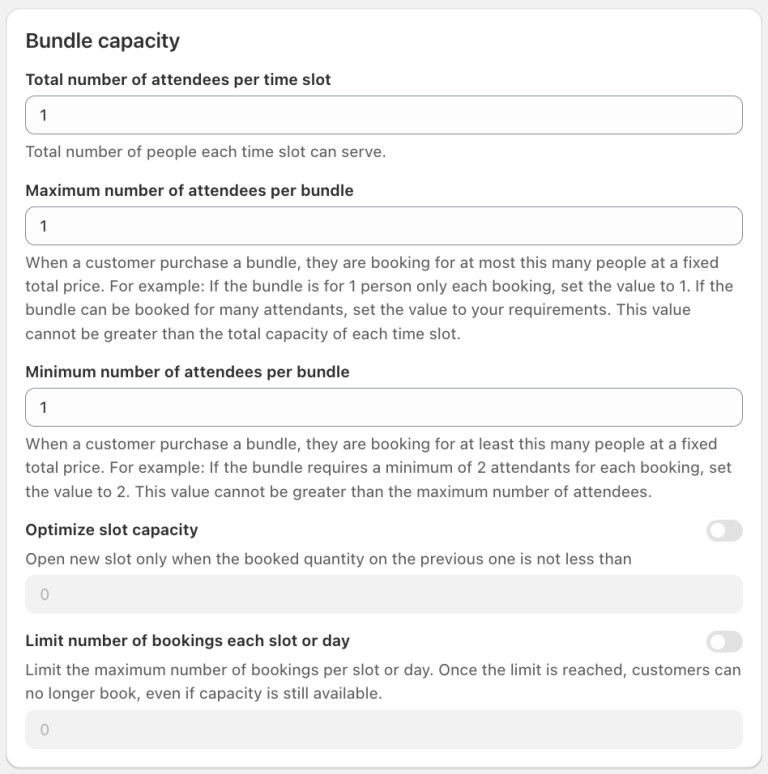
Bundle capacity
This feature allows merchants to control the number of attendees that can be accommodated in each time slot and define booking limits for a service bundle.
a. Total Number of Attendees per Time Slot
Defines the total number of people that each time slot can accommodate.
This determines the overall capacity available for each booking slot.
b. Maximum Number of Attendees per Bundle
Defines the maximum number of attendees that can be included in a bundle booking at a fixed total price.
For example, if the bundle is designed for a maximum of 5 people per booking, set the value to 5.
The value cannot be greater than the total capacity of each time slot.
c. Minimum Number of Attendees per Bundle
Defines the minimum number of attendees required for each bundle booking at a fixed total price.
For example, if each bundle booking requires at least 2 people, set the value to 2.
The value cannot be greater than the maximum number of attendees per bundle.
d. Optimize Slot Capacity
When enabled, a new time slot will only be opened when the booked quantity in the previous slot reaches the configured threshold.
This helps optimize capacity utilization and avoid opening unnecessary time slots.
e. Limit Number of Bookings per Slot or Day
Allows merchants to limit the maximum number of bookings that can be made per time slot or per day.
Once the booking limit is reached, customers can no longer make additional bookings, even if there is still available attendee capacity.
This provides an additional layer of control over the number of bookings accepted.
Purpose
The Bundle Capacity feature gives merchants greater control over both attendee capacity and booking volume, ensuring that bundle bookings stay within the configured limits while helping optimize the use of available time slots.
Bundle duration
This feature allows merchants to define how many bookings a customer can make and how long the purchased bundle remains available for scheduling.
a. Total Number of Bookings
Defines the number of bookings a customer can make after purchasing the bundle.
The booking limit can be configured for each variant included in the bundle.
The toggle allows merchants to enable or disable this booking limit. If disabled, this means no limit bookings.
b. Purchased Bundle Is Available to Schedule
Defines the period during which a customer can schedule bookings after purchasing the bundle.
When enabled, merchants can configure the availability period and its time unit.
The available time units can be selected from the dropdown, such as Hours/Days/Weeks/Months/Years.
Purpose
The Bundle Duration feature allows merchants to control both the number of bookings included in a bundle and the time period during which customers can use the purchased bundle to schedule their bookings.
Other features are the same as Standard booking configuration.
2. What does a Bundle booking look like for Customers?
To purchase a Bundle, customer can go on to the product page as usual.
For example, here is a customer process for purchasing a Bundle for 3 sessions of a Baking Workshop:
Click Book a new bundle > Continue button
Confirm message window and check out (the timeslots of each session for this bundle can be booked after check out)
Receive confirmation email with booking code and detail information
Go back to product page
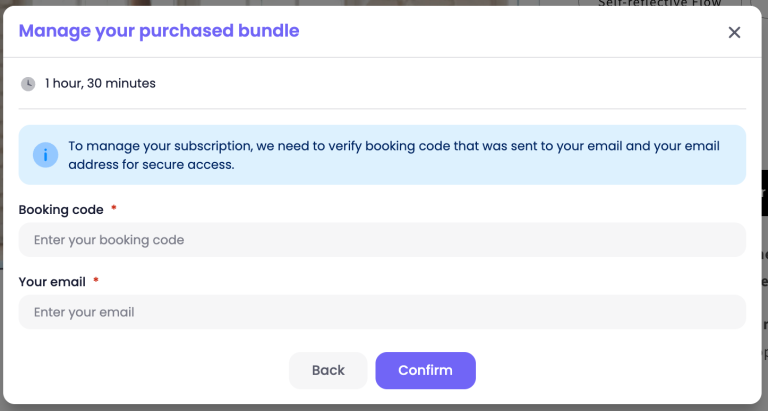
Click Managed your purchased bundle to book the remaining slots of the bundle
Enter the booking code from confirmation email and customer email
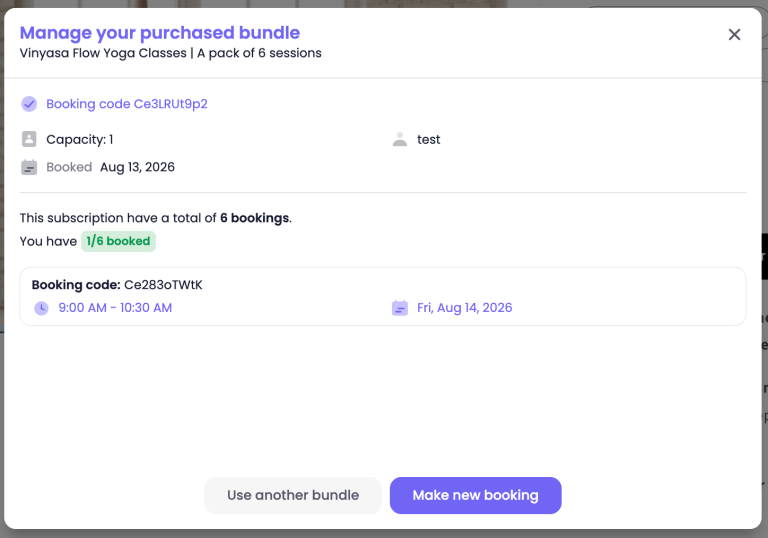
View the purchased bundle information, click Make new booking to book the timeslot for the bundle
If you need help setting up your Bundle bookings, our Customer Success team is here to assist. You can reach out to them through live chat, or by emailing support@meetyapp.io.
We’ll gladly provide tutorials, answer your questions, and ensure everything is set up properly.