Meety’s WhatsApp Notifications feature allows you to send appointment notifications via WhatsApp, enhancing customer communication by providing instant updates alongside traditional SMS notifications.
Here’s a closer look at how WhatsApp notifications works:
1. How to set up WhatsApp notifications?
To set up the WhatsApp notifications:
Go to Setting tab > Notifications > Choose WhatsApp notifications
Inside the WhatsApp Notifications page, you’ll find several sections:
Credits dashboard
View your Total credits, Used credits, and Remaining credits
Top up credits button: Click here to add more credits. After choosing an amount, a pop-up window will appear for checkout via Shopify
See WhatsApp pricing: Check your country’s WhatsApp pricing here
Note: Each store receives $1 in free credits to send test message
Message length
Each message is limited to 1600 characters. Messages exceeding this limit will be split into multiple parts, which may incur additional costs
Note: The actual character count may vary depending on placeholders used, which could result in messages being split and additional charges
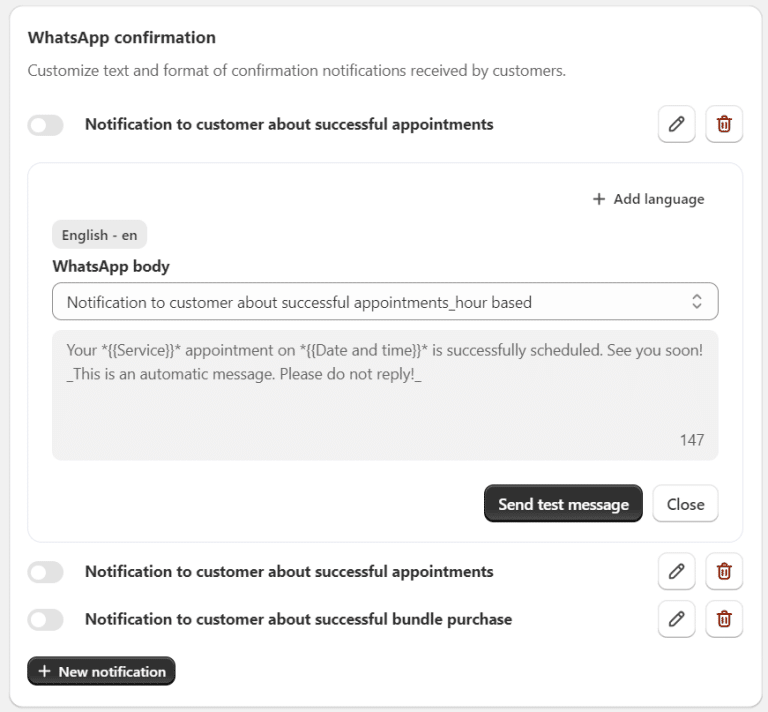
WhatsApp notification templates
Manage templates: view, edit, add new templates, add new language, or turn them on/off
Click Send Test SMS to preview your message
Note: While content in WhatsApp templates cannot be directly edited or added, you can contact Customer Support to request new templates for approval
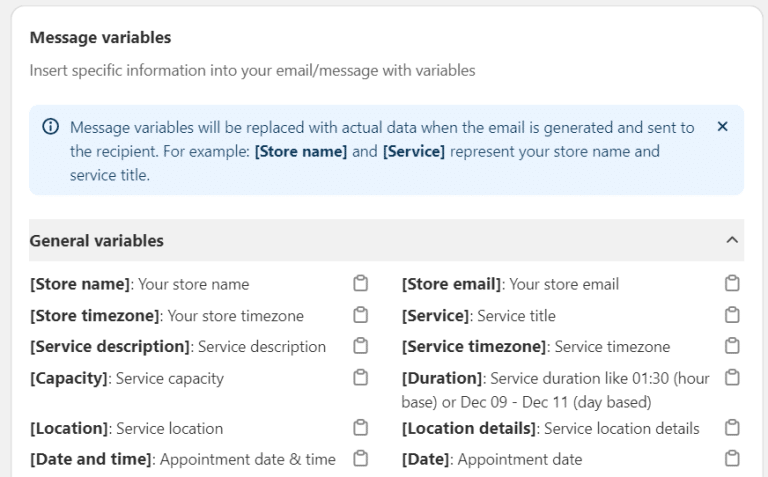
Message variables
Copy variables to customize WhatsApp messages with dynamic customer and booking details
2. How to manage WhatsApp notifications?
You can track and manage WhatsApp notifications easily using the WhatsApp History dashboard:
Go to the top right of the WhatsApp Notifications page > click WhatsApp history
From here, you can:
View the history of all WhatsApp messages sent
Click on each message to view its details
Export the message history
Check the status of each message (delivered or failed)
Resend failed messages
Note: If your credits run out , messages will show a Pending status. After topping up credits, click Resend to send these messages.
3. How do customers receive WhatsApp notifications?
Customers must provide their phone number during the booking process to receive WhatsApp notifications.
If WhatsApp notifications are enabled but the customer doesn’t use WhatsApp: The message will automatically be sent via SMS
If the customer doesn’t use WhatsApp and no phone number is provided: The message will fail and display a Failed status
If both SMS and WhatsApp are enabled, and the customer has both options: Notifications will be sent to both SMS and WhatsApp
If you need help with setting up WhatsApp notifications, our Customer Success team is here to assist. You can reach out to them through live chat, or by emailing support@meetyapp.io.